Wallpapers by Mijuru — Android

Documentation, FAQ and support for the Mijuru wallpaper app for Android. 4K & HD phone wallpapers, free, no ads.
English · Русский · Українська · Español · Português · Čeština · 한국어 · 日本語 · 中文 · हिन्दी · Tiếng Việt · Bahasa Indonesia · العربية
Wallpapers by Mijuru — for Android
Hand-picked 4K and HD phone wallpapers from mijuru.com.
Set one on your home screen, lock screen or both in a single tap. Free, no ads, no sign-up.
Report a problem · Suggest an idea · Product page · Privacy policy
[!NOTE] Early access. The Android app is currently in closed testing on Google Play. To get it:
- Join the tester group: https://groups.google.com/g/mijuru-wallpaper-app-testers
- Opt in to testing with the same Google account: https://play.google.com/apps/testing/com.mijuru.wallpaper
- Install from Google Play: https://play.google.com/store/apps/details?id=com.mijuru.wallpaper
iPhone: an iOS version is in development and is not available in the App Store yet.
This repository holds the public documentation and issue tracker for the app. The source code is private.
Contents
- Features
- Requirements
- Install / join testing
- How to set a wallpaper
- FAQ
- Troubleshooting
- Privacy
- Feedback and support
- Other Mijuru apps
- License
Features
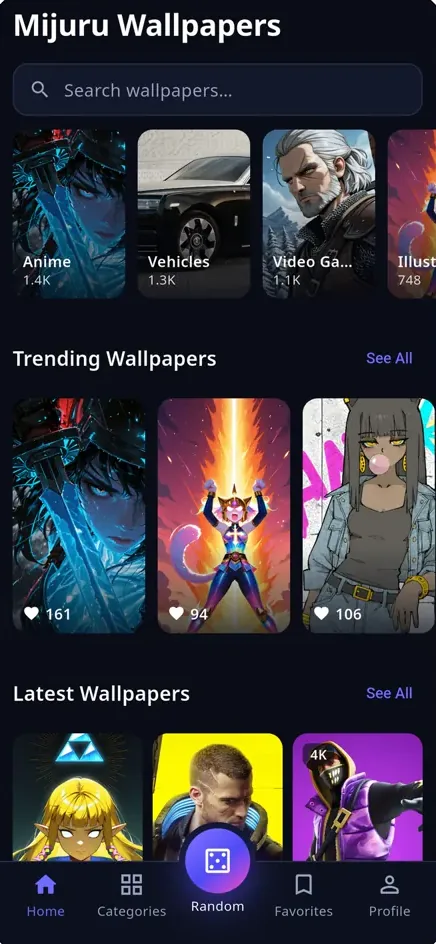
- Home. Trending (most downloaded) and Latest (fresh uploads) wallpapers, a category strip and search, in an endless three-column feed.
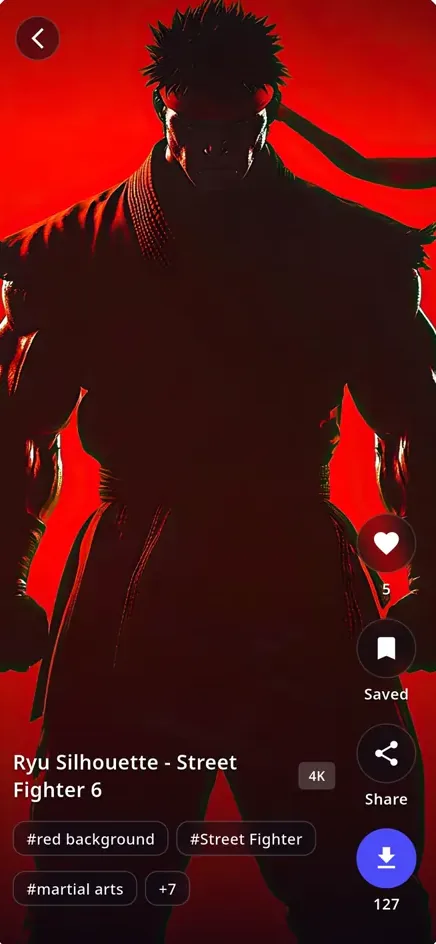
- Full-screen viewer. Swipe up for the next wallpaper, Reels-style. You can see likes and downloads, the category path and tags. Tap a tag to see more wallpapers with it.
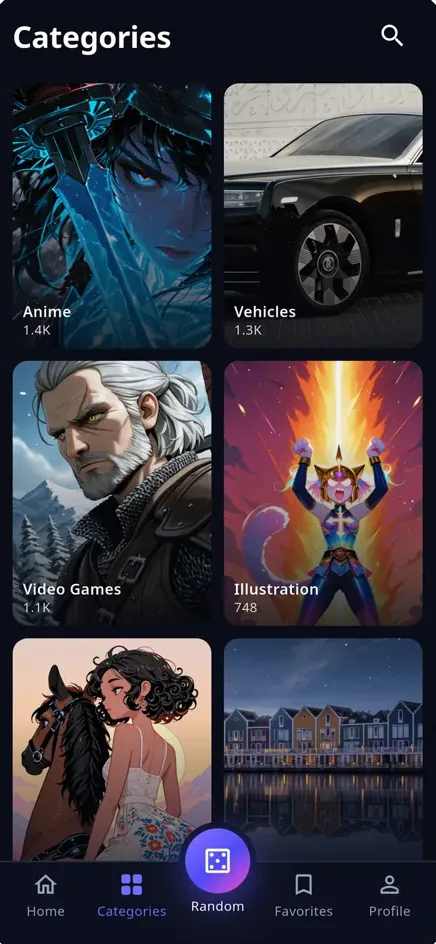
- Categories. A full category tree with nested subcategories, a breadcrumb path and wallpaper counts.
- Search. Search wallpapers, categories or tags, browse the tag cloud, and see how many results were found.
- Random. The dice button in the middle of the tab bar opens a random wallpaper. Tap “Roll again” for another.
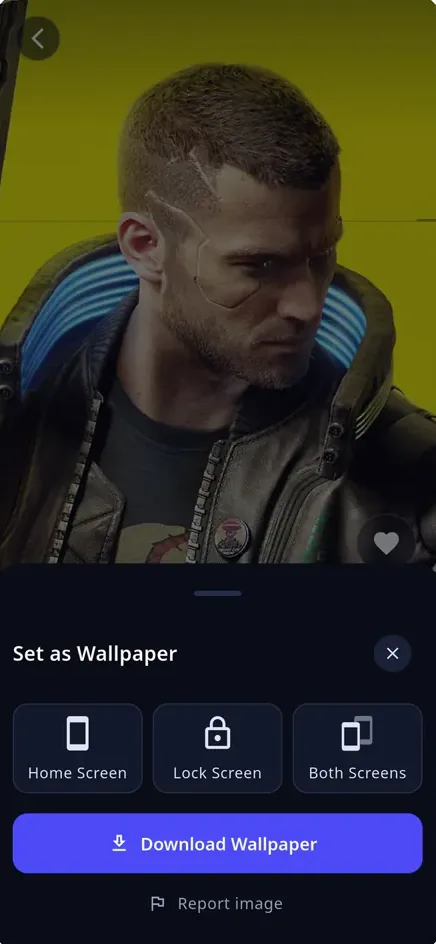
- Set in one tap (Android). Choose Home Screen, Lock Screen or Both Screens. The image is centre-cropped to fit your display.
- Download. Save any wallpaper to your gallery, with download progress shown. Your downloads are listed under Profile → Downloads.
- Favorites. Save wallpapers to Favorites. They are stored on your phone and need no account.
- Share. Send a link to the wallpaper’s page on mijuru.com.
- mijuru.com links open in the app (Android). A link to a wallpaper or category on mijuru.com opens straight in the app.
- Light, dark or system theme.
- 13 languages: English, Русский, Українська, Español, Português, Čeština, 한국어, 日本語, 中文, हिन्दी, Tiếng Việt, Bahasa Indonesia and العربية (Arabic is right-to-left). The app follows your device language, and you can change it in Profile.
- Report image. Use the link in the download sheet to report a wallpaper.
The app has no ads, no subscriptions and no account.
Requirements
- Android 7.0 (API 24) or newer.
- An internet connection. Wallpapers you have already viewed are cached, but you can’t browse offline.
Install / join testing
The app is in closed testing, so you join the tester list first:
- Join the Google Group mijuru-wallpaper-app-testers: https://groups.google.com/g/mijuru-wallpaper-app-testers
- Open the opt-in page and tap Become a tester. Use the same Google account: https://play.google.com/apps/testing/com.mijuru.wallpaper
- Install the app from Google Play: https://play.google.com/store/apps/details?id=com.mijuru.wallpaper
Google Play can take a few minutes to recognise you as a tester. If the store page says the app isn’t available, wait a little and reload it.
How to set a wallpaper
Android
- Open a wallpaper.
- Tap the set/download button at the bottom.
- Choose Home Screen, Lock Screen or Both Screens.
Or tap Download Wallpaper to save the image to your gallery instead.
iPhone (when the iOS version is released)
iOS does not let apps change the wallpaper themselves, so the app saves the image to Photos and shows a short guide:
- Tap Save to Photos.
- Open Photos, open the wallpaper and tap Share.
- Choose Use as Wallpaper, then pick Home Screen, Lock Screen or both.
FAQ
Is the app free? Yes. There are no ads, no subscriptions and no in-app purchases.
Do I need an account? No. Favorites and download history are kept on your phone.
Where do the wallpapers come from? From mijuru.com, a hand-picked collection of wallpapers in HD and 4K.
What resolution do I get? The app shows portrait (phone) wallpapers only and picks the best available size automatically, up to 4K. There is no size picker.
Can the app change my wallpaper automatically? Not yet. Each wallpaper is set by hand.
Can I use the wallpapers commercially? Wallpapers from mijuru.com are free for personal use only. Reselling them or using them commercially is not allowed.
Will my favorites move to a new phone? No. Favorites are stored on your device only, and there is no cloud sync.
Is there an iPhone version? It is in development. Follow this repository or mijuru.dev for news.
How do I change the language or theme? Go to Profile → Language, or Profile → Appearance (System / Light / Dark).
Why did a mijuru.com link open in the browser and not in the app? Only links to a wallpaper page or a category page open in the app. Everything else stays in the browser. On some phones you may need to turn on “Open supported links” for the app in Android Settings → Apps → Wallpapers by Mijuru.
How do I uninstall it? Long-press the icon and choose Uninstall, or go to Android Settings → Apps. Your favorites and downloads list are removed along with the app. Images you saved to the gallery stay there.
Troubleshooting
| Problem | What to do |
|---|---|
| The lock screen didn’t change on a Xiaomi / Redmi / POCO phone (MIUI / HyperOS). | MIUI can block apps from setting the lock screen. Download the wallpaper, then set it from Settings → Display → Wallpaper (or open it in the Gallery and use “Set as wallpaper”). |
| “Too many downloads. Try again in a minute.” | mijuru.com limits how many downloads can be made in a short time. Wait a minute and try again. |
| “The download link expired.” | Download links are only valid for a short time. Go back, open the wallpaper again and retry. |
| “This wallpaper is no longer available.” | It was removed from mijuru.com. Pick another one. |
| “Permission denied — Enable in Settings.” | On Android 10 and older, saving to the gallery needs storage permission. On iPhone it needs Photos access. Go to system Settings → Apps → Wallpapers by Mijuru → Permissions, allow access, and try again. |
| Search finds very little in some languages. | This is a known server-side issue. In Czech, Korean, Japanese, Chinese, Hindi, Vietnamese, Arabic and Indonesian, search and tag filters cover only part of the catalog for now. The feed and categories are complete. As a workaround, search in English or switch the app to English. |
| The wallpaper looks shifted or cropped. | The image is centre-cropped to your screen’s aspect ratio. If the subject is near the edge, download the image and adjust it in your phone’s wallpaper editor. |
| “No connection” / the server is unreachable. | Check your internet connection and pull to refresh. |
None of these helped? Open a bug report.
Privacy
- We collect no personal data. The app has no account, no analytics, no ads, no tracking SDKs and no crash reporting.
- Network: the app talks only to
mijuru.com, over HTTPS. Requests include your selected language and what you search or filter. The “Rate the app” feature uses Google Play’s own review screen. - Stored on your device only: the image cache, Favorites, your downloads list, your theme and language choices, and a counter for the rate-app prompt (how many times you set or saved a wallpaper and when you were last asked).
- Permissions (Android):
INTERNET: loads wallpapers from mijuru.com.SET_WALLPAPER: sets the wallpaper on your home or lock screen.WRITE_EXTERNAL_STORAGE: Android 10 and older only, to save images to your gallery.
- Permissions (iOS): Photos access, to save wallpapers to your Photos library.
Full policy: https://mijuru.com/mobile-app-privacy-policy
Feedback and support
| What | Where | |
|---|---|---|
| 🐞 Something doesn’t work | Report a problem | GitHub Issues |
| 💡 Idea or suggestion | Share an idea | GitHub Discussions |
| ❓ Question | Ask in Q&A | GitHub Discussions |
| ✉️ Private matter | m@mijuru.dev |
Issues are for problems only — ideas, suggestions and questions live in Discussions, where everyone can vote 👍 for the ideas they like most. Please write in English so everyone can find and follow the conversation — a machine translation from your language is perfectly fine. Before posting, search existing issues and discussions: a 👍 on an existing one helps more than a duplicate.
🚩 To report a wallpaper (copyright, inappropriate content), use Report image in the app or on the wallpaper’s page on mijuru.com.
⭐ Like the app? Use Profile → Rate the app. It helps a lot.
More wallpapers on mijuru.com
The full collection lives on the website — handy when you want to pick a wallpaper on another device or a size the app doesn’t show:
- Desktop wallpapers by resolution — 4K, 2K, Full HD, ultrawide
- Wallpaper packs — themed collections
- Phone wallpapers by brand — iPhone, Samsung, Xiaomi and more
- Avatars and profile pictures for Instagram, Discord, TikTok
Other Mijuru apps
- 🌐 Website: mijuru.com, wallpapers for phone and desktop, plus avatars.
- 🖥️ Linux desktop app: Snap Store. Set wallpapers in one click and change them on a schedule. Docs: mijuru-dev/wallpapers-desktop-app.
- 🧩 Browser extension: a new wallpaper on every new tab, for Chrome, Edge and Firefox. Docs: mijuru-dev/wallpapers-browser-extension.
- 🏠 All products: mijuru.dev
License
Wallpapers by Mijuru is proprietary software. © 2026 Mijuru. All rights reserved. This repository contains documentation only. Wallpapers are subject to mijuru.com’s terms: free for personal use, no resale or commercial use.